
Cereus Monitor – System Health Monitoring Plugin for Cacti
Cereus Monitor – Know When Cacti Needs Attention
Monitor the health of Cacti itself — not just the devices it monitors. Track backup jobs, cron daemon, poller activity, and locked graph trees. Run automated system health checks and receive scored reports by email. 100% free.
Who Monitors the Monitor?
Cacti is excellent at monitoring your network infrastructure. But who checks that Cacti itself is healthy? Cereus Monitor fills this gap — it watches the Cacti installation’s own operational status and alerts your team the moment something goes wrong.
Every 5 minutes the plugin checks whether the backup job ran, whether the cron daemon is active, whether the poller completed its last cycle, and whether any graph trees are stuck in a locked state. State-change alerts mean you hear about problems when they happen — not when someone notices graphs have stopped updating days later.
Scheduled health checks (daily, weekly, or monthly) run a comprehensive suite of ~20 diagnostic rules across configuration, performance, security, and data integrity. Each check is scored and the results arrive in your inbox as a structured HTML report.
Cereus Monitor Dashboard
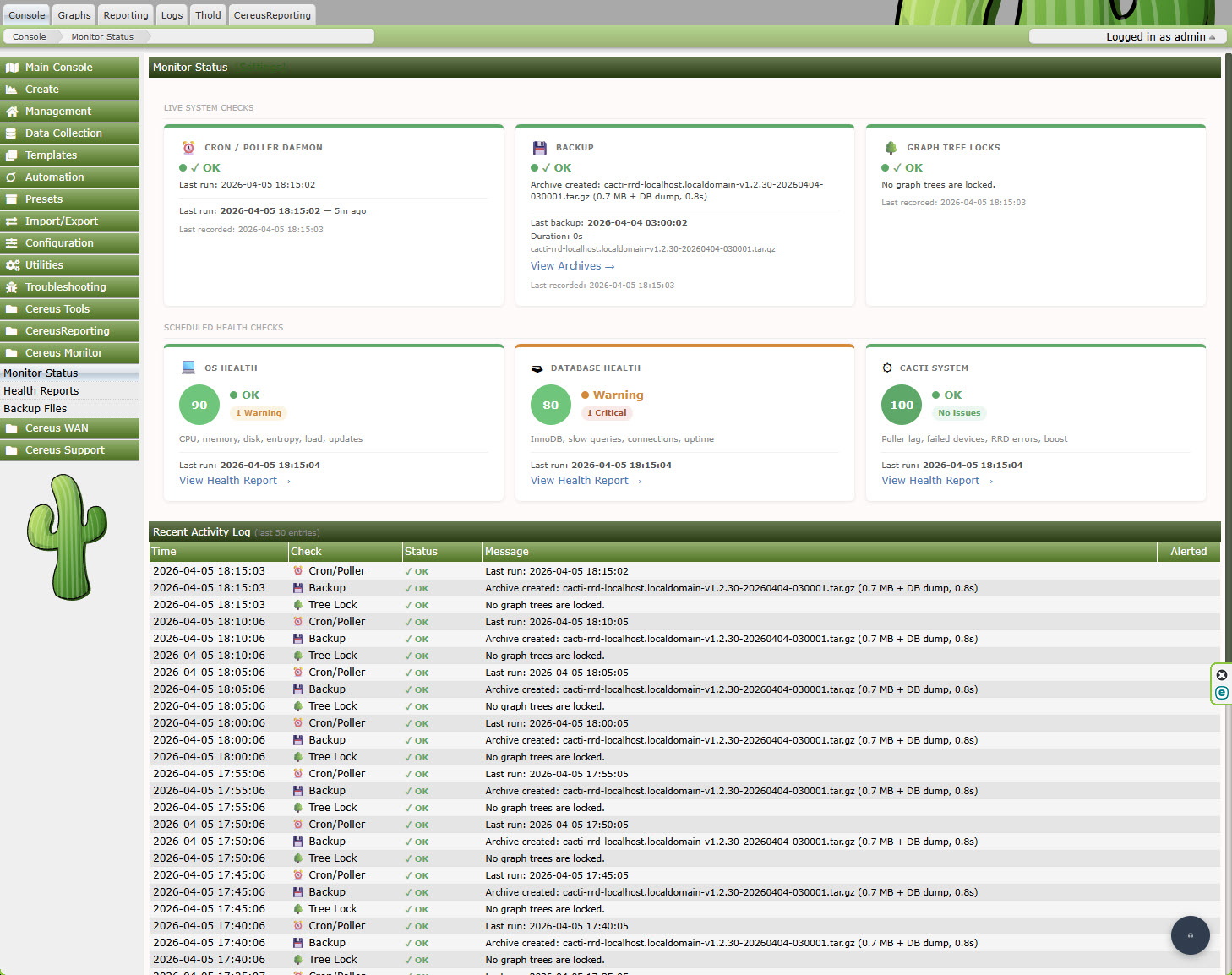
Six Checks, Continuous Visibility
Backup Status
Tracks the last successful backup of Cacti’s RRD files and database. Know immediately if a backup job failed or has not run within the expected window. Includes a CLI backup tool supporting direct tar and LVM snapshot methods.
Cron & Poller Daemon
Detects whether the Cacti cron entry is running and whether the poller daemon completed its most recent cycle within an expected time window. Alerts if polling has silently stopped — before your graphs go flat.
Locked Graph Trees
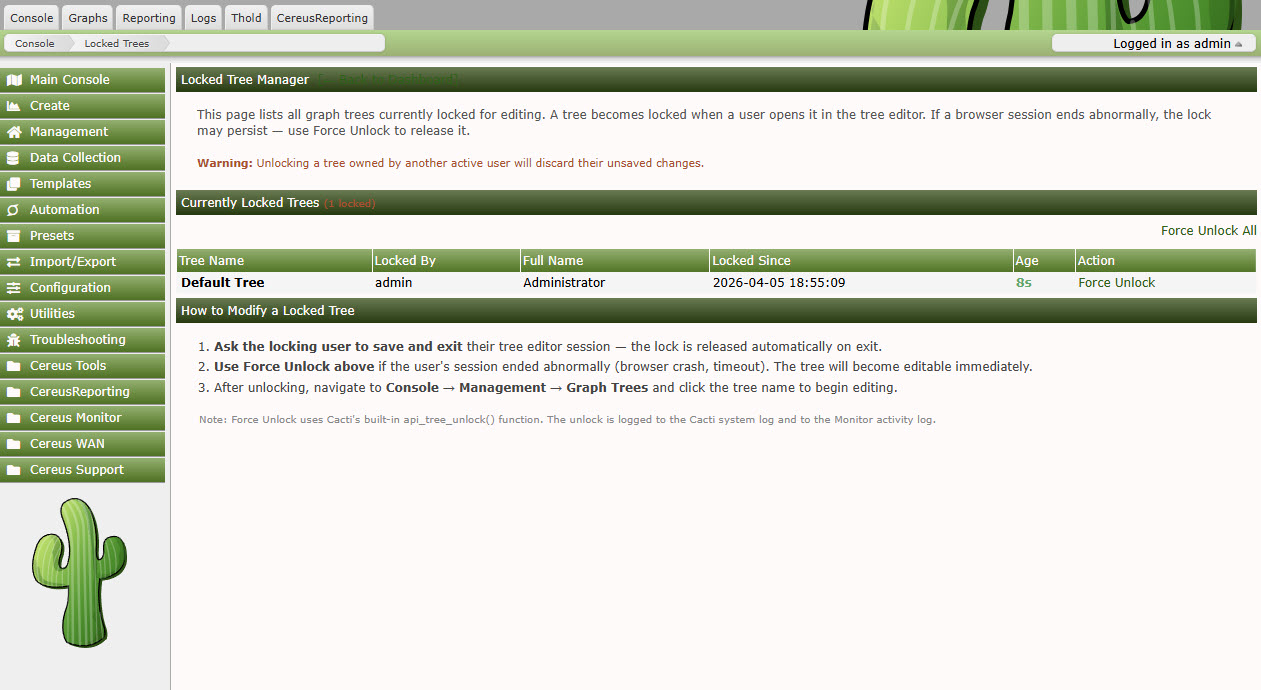
Identifies graph trees stuck in a rebuild-locked state. Lists all locked trees on the dashboard and provides one-click force-unlock without needing direct database access. Bulk unlock available for mass recovery.
Scheduled Health Checks
I am text block. Click edit button to change this text.
State-Change Email Alerts
Alerts fire only on status transitions (OK → Error and Error → OK), not on every poller cycle. No alert fatigue. When a backup fails you hear about it once. When it recovers you hear about that too.
Backup Archive Manager
View, download, and delete versioned backup archives from the Cacti UI. Automatic retention keeps the N most recent archives. Archive names include hostname, version, and timestamp for unambiguous identification.
Scheduled Health Report with Findings
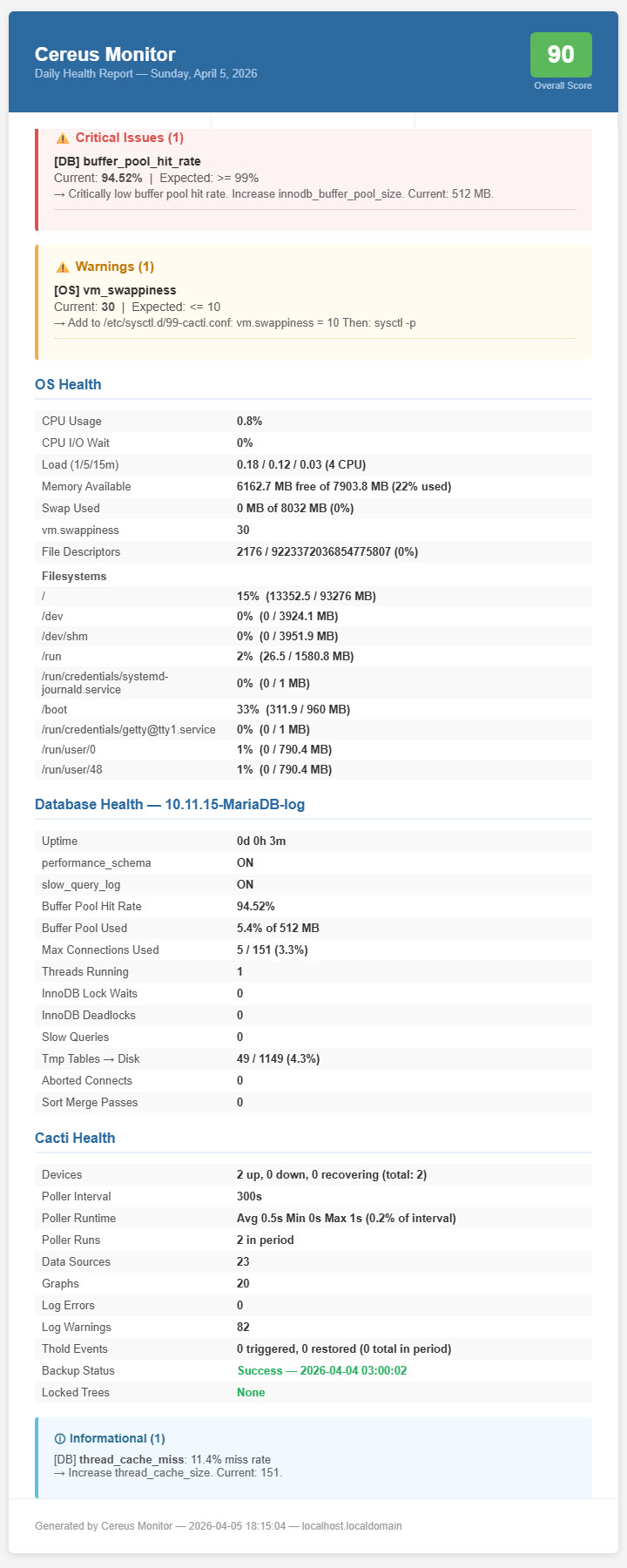
Health reports list every finding categorised as Critical or Warning, with a composite score and actionable remediation guidance.
Completely Free — No License Required
Cereus Monitor has no paid tiers. Every feature — backup monitoring, cron checks, health reports, email alerts, locked tree recovery, the backup CLI tool — is included in the free open-source release. Install it, configure your alert email, and you’re done.
Recover Locked Trees Instantly
Cacti graph trees lock during rebuild operations. If the rebuild process crashes — due to a PHP timeout, a killed process, or a server restart — the tree stays locked indefinitely. Graphs stop rendering. Users report that the tree is broken.
Cereus Monitor detects every locked tree and lists them on the dashboard. One click unlocks a single tree. One more click unlocks all of them at once. No need for a database console or shell access.
Locked Tree Manager
Technical Requirements
- Cacti: 1.2.17 or newer
- PHP: 7.4 or newer (8.x recommended)
- Email Alerts: Requires a working Cacti mailer configuration (Settings → Mail)
- Backup CLI (LVM method): Requires root or sudo access on the server
- Database: MySQL 5.7+ / MariaDB 10.3+
Frequently Asked Questions
How often do the live status checks run?
The backup, cron, poller and tree-lock checks run every 5 minutes via the Cacti poller_bottom hook. Email alerts fire only on state changes (OK to Error, or Error to OK), not on every check cycle.
How do I schedule health reports?
In Settings → Monitor, choose a frequency (daily, weekly, or monthly), the hour of the day to run, and one or more recipient email addresses. The next run is displayed on the settings page.
What does the health score measure?
The score starts at 100. Each Critical finding deducts 20 points; each Warning deducts 10. A score of 100 means no findings. A score below 60 indicates multiple serious issues that need attention. Scores are stored historically so you can track improvement over time.
Does the backup CLI require root access?
The direct tar method works without root and backs up the RRD directory and database. The LVM snapshot method creates a point-in-time consistent snapshot and does require root or sudo. Both methods are configured independently.
Will Cereus Monitor work on a Cacti spine installation?
Yes. The plugin uses Cacti’s poller_bottom hook which runs after each polling cycle regardless of whether you use cmd.php or the Spine binary poller.
Install in Minutes. Know the Moment Something Breaks.
Free, open source, no registration. Just install, configure your alert email, and relax.