
MCAP – Multi-Channel Alerting Plugin for Cacti
MCAP – Multi-Channel Alerting Plugin for Cacti
Route Cacti threshold breaches and device up/down events to Slack, Microsoft Teams, PagerDuty, OpsGenie, Telegram, Twilio, Webhook and Email — with deduplication, maintenance windows, and escalation policies.
Stop Missing Critical Alerts
MCAP intercepts every Cacti threshold breach (via Thold) and every device up/down state change and routes them through configurable alert profiles to one or more notification channels.
Eliminate alert fatigue with built-in deduplication — identical alerts within a configurable window are suppressed. Schedule maintenance windows to silence alerts during planned outages. Define escalation chains so unacknowledged alerts automatically reach the right team.
The Community edition is free and covers Email, Slack and Webhook out of the box. Upgrade to Professional or Enterprise to unlock enterprise-grade channels and advanced routing.
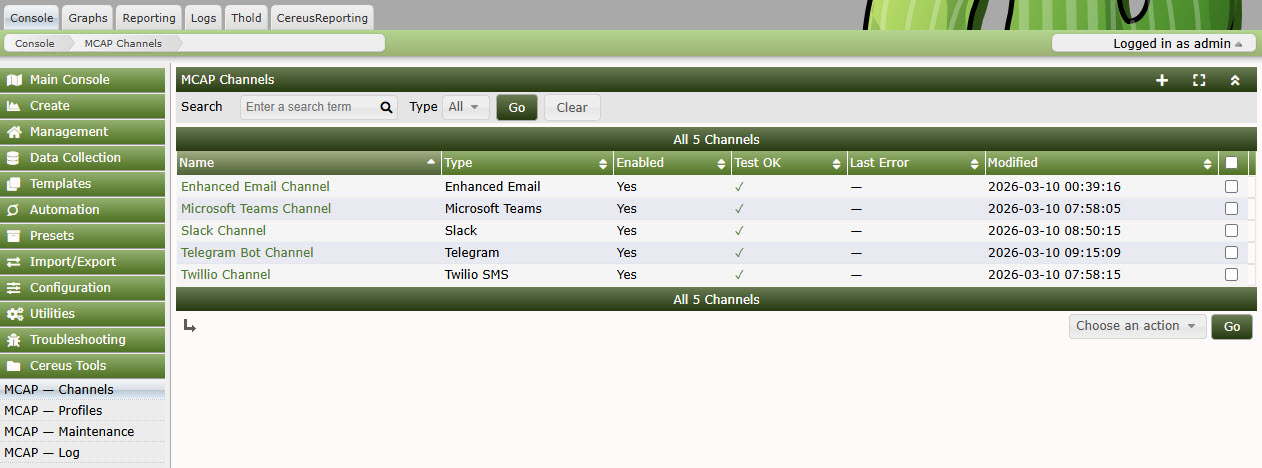
MCAP Channel Management
Everything You Need to Stay Informed
8 Notification Channels
Slack, Microsoft Teams, PagerDuty, OpsGenie, Telegram, Twilio SMS/Voice, Generic Webhook, Email. Each channel is independently configurable with its own credentials and filters.
Smart Alert Routing
Route by severity (Warning / Alert / Emergency), event type (threshold breach / device down), time of day, and device group. Multiple profiles let you build separate workflows for different teams.
Maintenance Windows
Schedule recurring or one-time maintenance windows at the profile level. Alerts generated during a window are silenced — no more on-call noise during planned outages.
Deduplication
Identical alerts within a configurable cooldown window are automatically suppressed. Keep your inbox and chat channels clean without missing genuine new events.
Graph Thumbnails
Attach the relevant Cacti graph thumbnail directly to Slack and Teams notifications. See the spike at a glance without logging into the Cacti UI.
Audit Log & CSV Export
Every delivered alert is logged with channel, status and timestamp. Export filtered log data to CSV for reporting, compliance and post-incident review.
MCAP Profile & Routing Configuration
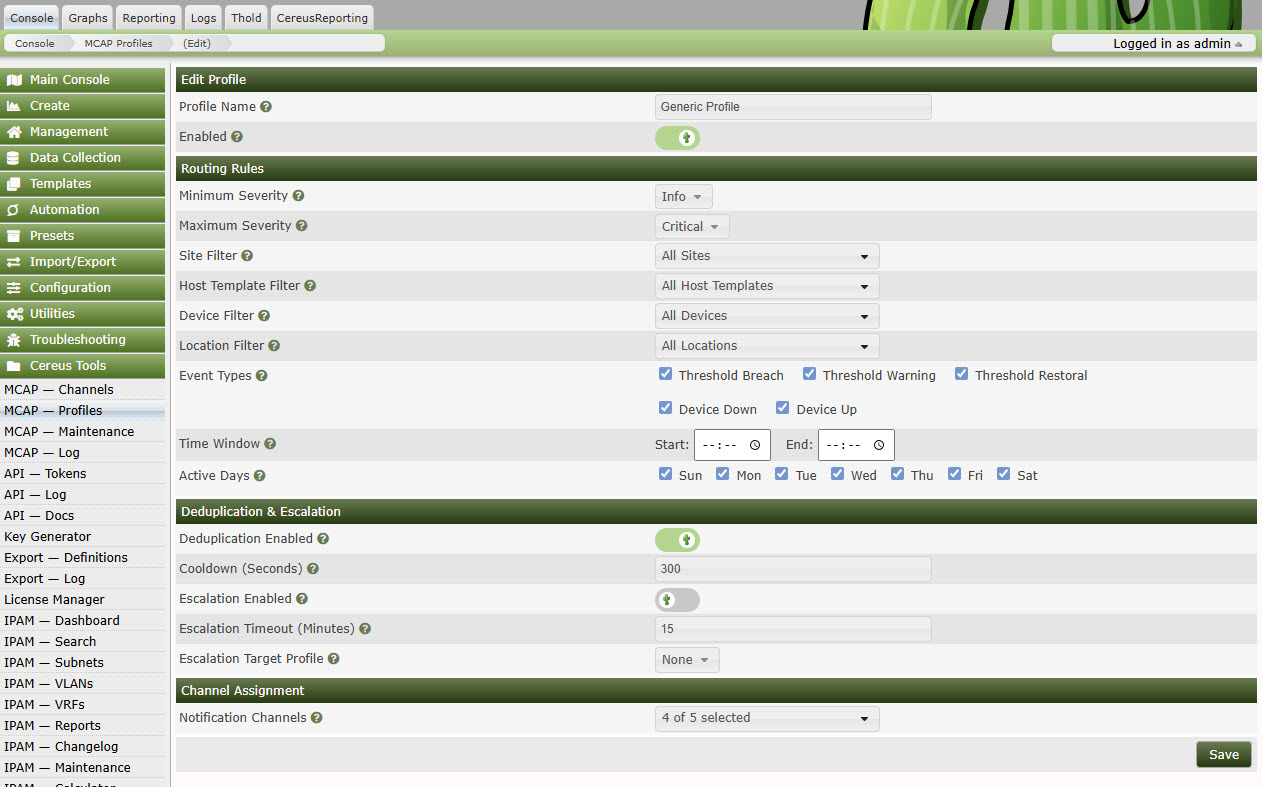
Alert profiles let you define which channels receive which events, with per-severity and per-device-group routing.
Pricing
| Feature | Community Free | Professional Contact for pricing | Enterprise Contact for pricing |
|---|---|---|---|
| Notification Channels | Email, Slack, Webhook | + Teams, Telegram | + PagerDuty, Twilio, OpsGenie |
| Max Channels | 2 | 10 | Unlimited |
| Alert Profiles | 1 | 10 | Unlimited |
| Severity + Event Filtering | ✓ | ✓ | ✓ |
| Deduplication | — | ✓ | ✓ |
| Graph Thumbnails in Alerts | — | ✓ | ✓ |
| Advanced Routing Rules | — | ✓ | ✓ |
| Maintenance Windows | — | — | ✓ |
| Escalation Policies | — | — | ✓ |
| Audit Log + CSV Export | — | ✓ | ✓ |
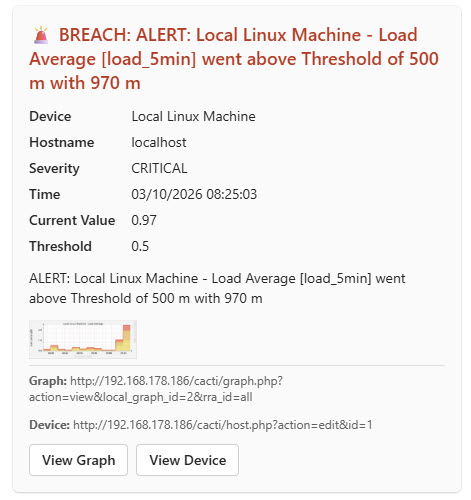
Example Teams Alert with Graph Thumbnail
Rich Alerts with Context
MCAP enriches every notification with the data that matters:
- Device name, IP address and site information
- Threshold name, current value and breach level
- Graph thumbnail showing the metric at time of breach (Professional+)
- Direct link back to the Cacti graph page
- Timestamp and alert sequence number
Your on-call engineer has everything they need to triage the issue without opening Cacti first.
Technical Requirements
- Cacti: 1.2.17 or newer
- PHP: 7.4 or newer (8.x recommended)
- Thold Plugin: Required for threshold-based alerts
- Cereus License Manager: Required for Professional and Enterprise editions
- Database: MySQL 5.7+ / MariaDB 10.3+
Frequently Asked Questions
Does MCAP work without the Thold plugin?
MCAP supports two independent event sources: Thold threshold breaches and native Cacti device up/down events. Device monitoring works without Thold. Threshold alerts require Thold to be installed and active.
Can I send alerts to multiple channels for the same event?
Yes. Each alert profile can map to multiple channels simultaneously. For example, send Warning alerts to Slack and Critical alerts to both PagerDuty and a Slack escalation channel.
How does deduplication work?
MCAP tracks a hash of each alert (device + threshold + severity). If an identical alert fires again within the configured cooldown window it is suppressed. The cooldown resets once the alert clears.
Is the Community edition really free?
Yes — the Community edition is open source and free forever. It supports Email, Slack and Webhook with up to 2 channels and 1 alert profile.
Can I upgrade from Community to Professional later?
Yes. Install the Cereus License Manager plugin, apply your Professional license key, and the additional features unlock immediately — no reinstallation needed.
Ready to Tame Your Cacti Alerts?
Free to download. No registration required. Upgrade when you need more.