
Cereus Insights – AI Monitoring Intelligence for Cacti
Cereus Insights – AI Monitoring Intelligence for Cacti
Thold tells you when a threshold is crossed. Cereus Insights tells you when something is unusual — even when no threshold fires. Seasonality-aware anomaly detection, per-datasource capacity forecasting, and AI-generated alert summaries. No per-device configuration required.
Stop Reacting. Start Anticipating.
Static threshold alerting has a fundamental blind spot: it has no idea what “normal” looks like for a given metric at a given time. A core interface running at 200 Mbps on a Tuesday afternoon is deeply anomalous — even if it never crosses your threshold cap. Thold will never fire. Cereus Insights will.
Cereus Insights builds a statistical baseline for every datasource, hour-by-hour, day-by-week. It knows that your backup server CPU spikes every Monday morning, that your WAN link dips on Friday evenings, and that 300 Mbps at 14:00 on a Tuesday is not business as usual. It works automatically with every active Cacti datasource — no templates to write, no devices to configure.
The Community edition is free and includes capacity forecasting with saturation dates. Professional adds seasonality-aware anomaly detection. Enterprise adds LLM-generated alert summaries that turn 40 simultaneous breach emails into one plain-English briefing.
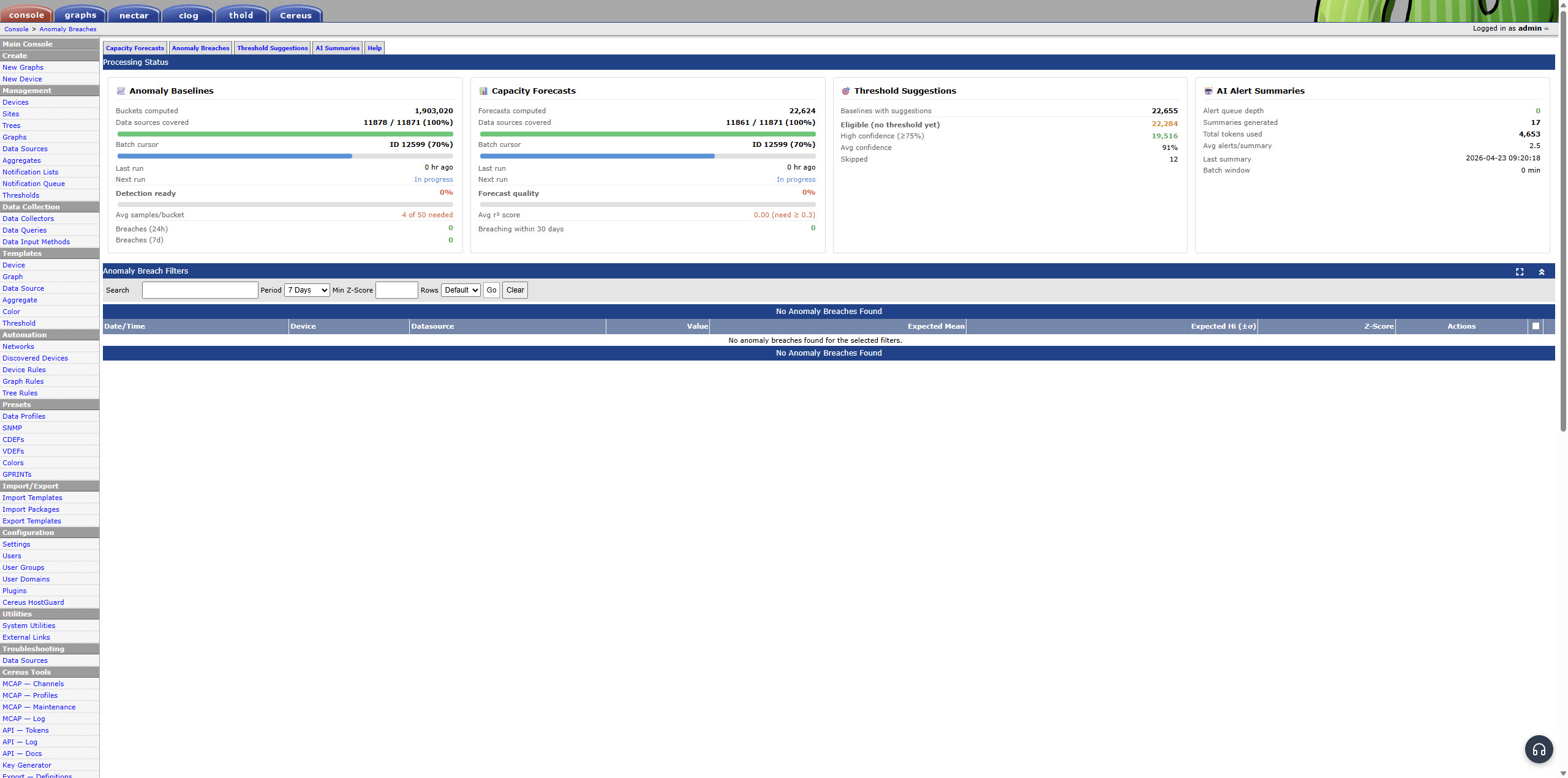
Anomaly Breaches — z-score coloured table
Three Layers of Intelligence, One Plugin
Each tier adds a capability. Each capability runs automatically against all your existing Cacti data.
Capacity Forecasting
Community — Free
Reads daily-maximum values from every RRD file and runs a least-squares linear regression. Projects when each datasource will reach its Thold thold_hi threshold. Updates every 6 hours. R² column shows forecast confidence so you can separate reliable trends from noise.
If a disk fills up in 18 days, you see it three weeks before the 3am alert.
Anomaly Detection
Professional
Builds 168 baseline buckets per datasource — one for each hour-of-day × day-of-week combination. At each poll cycle it computes a z-score against the historical baseline for that exact time slot. Breach if |z| exceeds the configured sigma (default 3.0).
Catches the unusual quiet on a normally-busy link. Catches the unexpected spike at an hour that is normally flat. Does not fire for expected recurring patterns.
AI Alert Summaries
Enterprise
Hooks into the Thold breach log. Accumulates alerts over a configurable window (default 5 minutes), then sends the batch to the Claude API for a plain-English operational summary. A switch going down triggers 40 Thold alerts — you receive one email describing what happened.
Uses your own Anthropic API key. Approximate cost: under €1/month on a busy instance using the Haiku model.
Capacity Forecasts — saturation dates with R² confidence
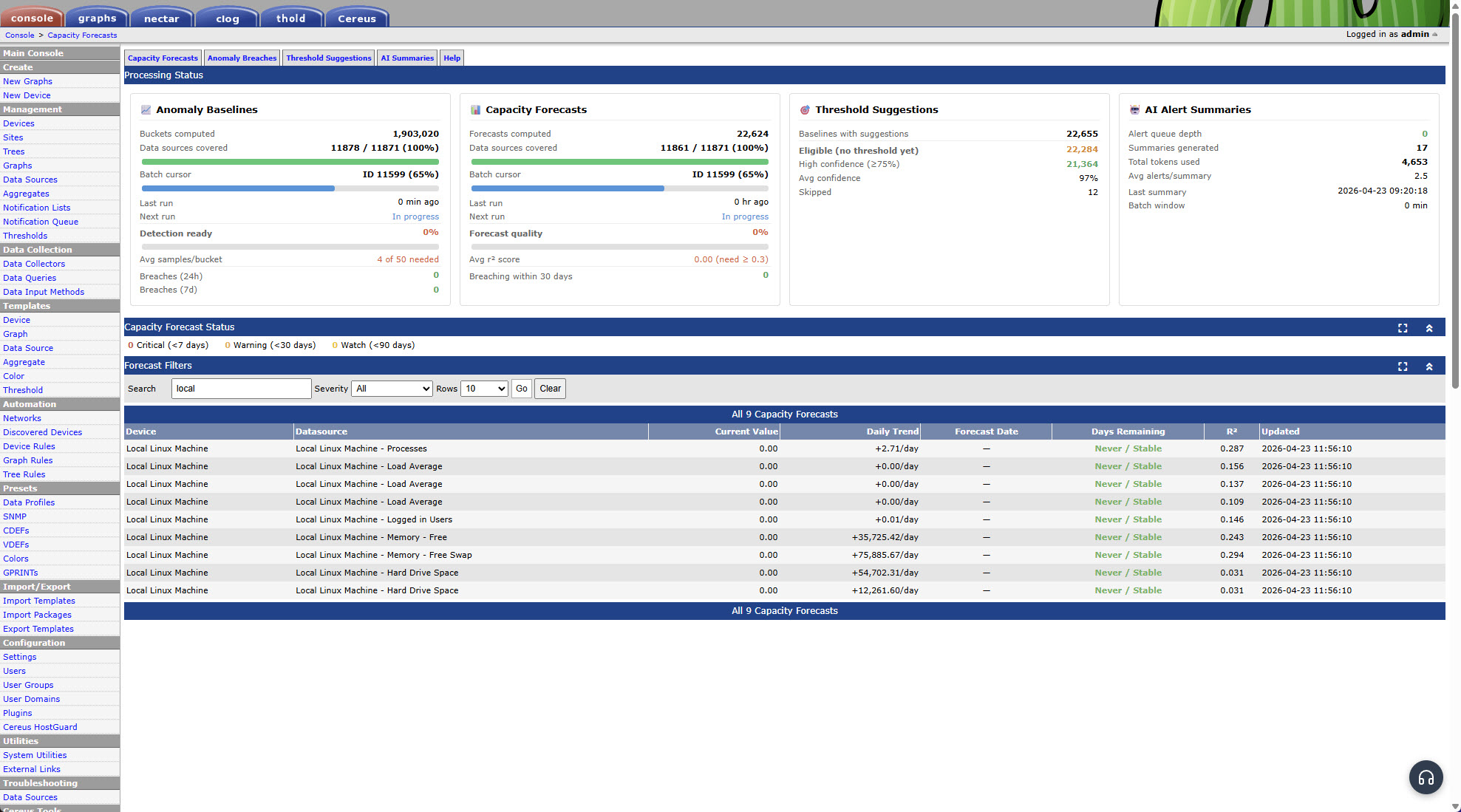
Capacity Forecasts view: saturation date, daily growth rate, current value, R² regression quality, and colour-coded urgency (red = within 7 days, orange = within 30 days).
How It Works
1. Install & Enable
Copy the plugin to plugins/cereus_insights/ and enable it in the Cacti Plugin Manager. No database schema changes to existing tables.
2. Poller Runs
The plugin hooks into Cacti’s poller_bottom event. It processes datasources in batches using a round-robin cursor — the poller is never blocked. Forecasting activates on the first cycle. Baselines build over time from existing RRD data.
3. Forecasts & Baselines Populate
Forecasts appear within 6 hours of install on datasources with 3+ days of RRD history. Anomaly detection activates for datasources whose RRD files already contain sufficient history — typically within hours on a mature Cacti instance.
4. Review in Cacti
Three pages under Cereus Tools: Capacity Forecasts, Anomaly Breaches, and AI Alert Summaries. Filter by device, time period, severity, or z-score. No separate login, no separate UI — it lives where your monitoring already is.
Pricing
| Feature | Community Free | Professional from €199/year | Enterprise from €449/year |
|---|---|---|---|
| Capacity Forecasting | ✓ | ✓ | ✓ |
| Saturation Dates & R² Confidence | ✓ | ✓ | ✓ |
| Anomaly Detection | — | ✓ | ✓ |
| 168-Bucket Seasonality Baselines | — | ✓ | ✓ |
| Configurable Sigma Threshold | — | ✓ | ✓ |
| AI Alert Summarization (Claude API) | — | — | ✓ |
| Configurable Batch Window & LLM Model | — | — | ✓ |
| Email Summary Delivery | — | — | ✓ |
One Summary Instead of 40 Alerts
When a core switch goes down, Thold fires one alert per threshold per device. On a large Cacti instance this means dozens of simultaneous breach emails — all saying different things about the same root cause.
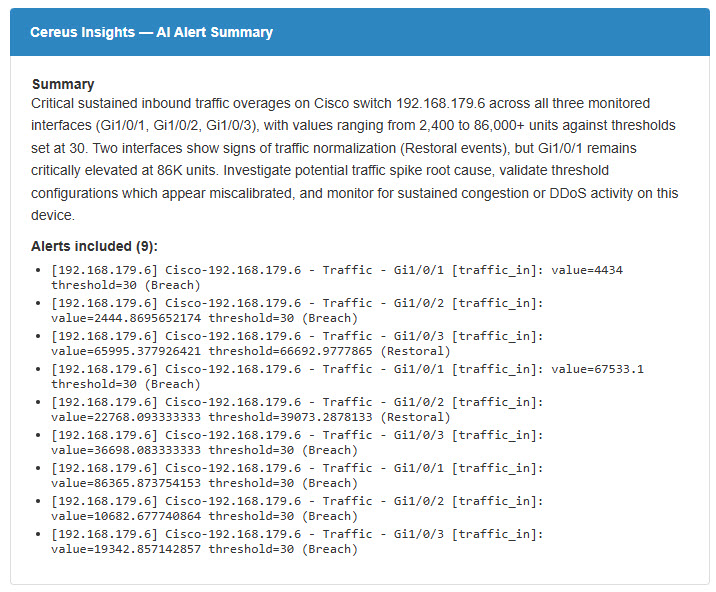
Cereus Insights holds those alerts in a queue for a configurable window (default 5 minutes), then sends the entire batch to the Claude API. The result is a single plain-English summary that identifies the affected devices, the likely root cause pattern, and which alerts are probably correlated.
- Uses your own Anthropic API key — no data leaves your server otherwise
- Choose Haiku (fast, inexpensive) or Sonnet (higher-quality summaries)
- Summary stored in Cacti for review; emailed to configured recipients
- Cost: typically under €1/month on a busy instance with Haiku
AI Alert Summary — plain-English briefing from a batch of Thold breaches
Technical Requirements
- Cacti: 1.2.0 or newer
- PHP: 8.1 or newer
- rrdtool: Must be accessible from PHP via
exec()— standard on all Cacti installations - Thold plugin: Required for anomaly detection (current values) and AI alert summarization; capacity forecasting works without it
- Cereus License Manager: Required for Professional and Enterprise editions
- Anthropic API key: Required for AI alert summarization (Enterprise only); obtained from console.anthropic.com
- PHP ext-curl: Required for AI alert summarization; standard on most hosts
Frequently Asked Questions
Does this replace Thold?
No — it works alongside Thold, not instead of it. Thold handles static threshold alerting. Cereus Insights adds time-aware anomaly detection and capacity forecasting on top. The LLM summary feature specifically requires Thold to be installed and generating alerts.
How long does it take before anomaly detection starts working?
For Cacti instances with existing RRD history, anomaly baselines populate within hours of install. The plugin reads historical data from RRD files directly — it does not need to wait for new data to accumulate. For brand new datasources with no history, the default minimum sample count (50 samples per time bucket) is reached after approximately 25 weeks of polling at 5-minute intervals. You can lower the minimum to 20 to activate detection sooner, or to 5 for immediate (but less reliable) results.
Does capacity forecasting work without Thold?
Yes. Capacity forecasting reads directly from RRD files and uses Thold’s thold_hi value as the saturation target if available. Without Thold, forecasts still show trend slope and R² confidence — the saturation date column is simply blank for datasources without a configured threshold.
What data does the LLM feature send to Anthropic?
Only alert metadata: device hostname, datasource name, current value, threshold value, and breach status. No RRD data, no IP addresses, no passwords, and no Cacti configuration. The data sent is equivalent to what appears in a standard Thold alert email.
Can I run both Cereus Insights and Cereus IPAM on the same Cacti instance?
Yes. All Cereus plugins are independent and coexist on the same Cacti installation. They share one license key (via Cereus License Manager) and integrate into the same Cacti navigation. Cereus IPAM includes its own separate capacity forecasting for subnet address exhaustion — Cereus Insights forecasts are for RRD datasources (traffic, CPU, disk I/O, etc.).
Does it work on Windows Cacti installations?
Yes. The plugin uses standard PHP functions and Cacti’s own rrdtool wrapper for all RRD access. The poller hook runs the same way on Windows as on Linux.
Part of the Cereus Ecosystem
All Cereus plugins share one license key, one support contract, and integrate into the Cacti interface you already use.
Know What Is Unusual. Before It Becomes a Problem.
Capacity forecasting is free. No registration. No configuration. Install and it starts working.
Questions first? Book a free 20-min call.