
Cereus REST API – REST API Plugin for Cacti
Cereus REST API – Programmatic Access for Cacti
Expose your Cacti data via a clean, authenticated REST API. Query devices, graphs, data sources and poller status. Trigger device actions. Enforce role-based access control per Cacti user permissions — all with a full audit log.
Integrate Cacti Into Your Ecosystem
Cereus REST API adds a fully documented, token-authenticated API endpoint to any Cacti installation. Feed monitoring data into dashboards, CMDBs, automation pipelines and observability platforms — without screen-scraping or direct database access.
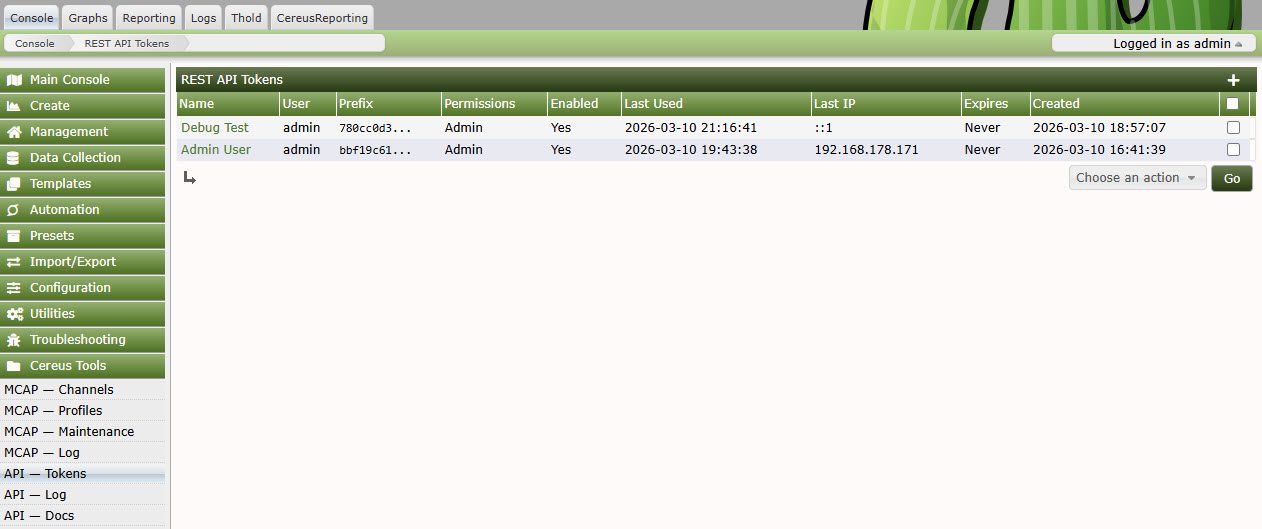
Every API token is scoped to a Cacti user account, meaning all existing Cacti user, group and device permissions are automatically enforced. There is no separate permission system to maintain.
The Community edition is free and provides read-only access with a single token. Professional and Enterprise editions unlock write operations, multiple tokens, device actions, IP address restrictions, and management APIs.
API Token Management
Built for Real Integration Workloads
Bearer Token Auth
SHA-256 hashed tokens stored in the database. Pass your token in the Authorization header or as a query parameter. Tokens carry no embedded permissions — access is resolved live from Cacti user rights.
5-Level RBAC
Viewer, Operator, Editor, Manager and Admin roles map directly to Cacti capabilities. Read-only tokens can never write. Device actions require Operator or above. User management requires Admin.
Comprehensive Endpoints
Devices, graphs, data sources, graph trees, poller status, data source values, rendered graph images, device actions (up/down/enable/disable), and plugin extension hooks for custom endpoints.
IP Allowlisting
Restrict each token to one or more IP addresses or CIDR ranges. Lock automation accounts to your CI/CD server IP so stolen tokens are useless from any other network location.
Full Audit Log
Every API call is logged with token identity, source IP, endpoint, HTTP method, response code and latency. Filter by date, token or endpoint. Export to CSV for compliance and security review.
Built-in API Docs
Interactive API documentation rendered server-side inside Cacti. Every endpoint documents its parameters, authentication requirements, request/response examples and error codes — always current for your installed version.
Built-in Interactive API Documentation
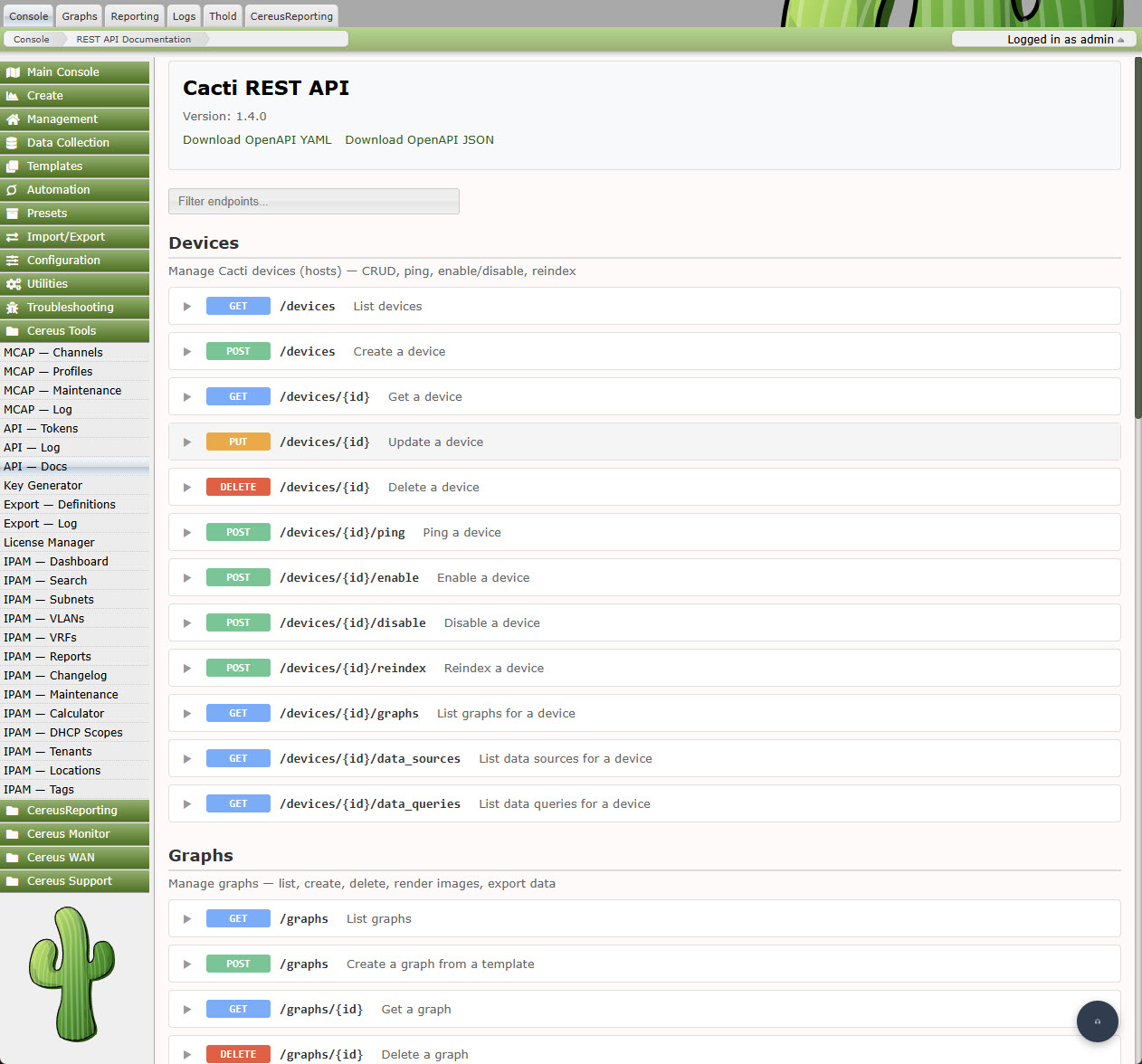
The built-in documentation page lists every endpoint with parameters, example responses and authentication requirements — served directly from Cacti.
Pricing
| Feature | Community Free | Professional Contact for pricing | Enterprise Contact for pricing |
|---|---|---|---|
| HTTP Methods | GET only | GET, POST, PUT, DELETE | GET, POST, PUT, DELETE |
| API Tokens | 1 | Unlimited | Unlimited |
| RBAC Roles | Viewer | All 5 roles | All 5 roles |
| Device Actions (rescan, up/down) | — | ✓ | ✓ |
| Graph Rendering via API | — | ✓ | ✓ |
| Data Source Values via API | — | ✓ | ✓ |
| IP Address Restrictions | — | ✓ | ✓ |
| User Management API | — | — | ✓ |
| Token Management API | — | — | ✓ |
| Poller Info & Rebuild API | — | — | ✓ |
Every Request Accounted For
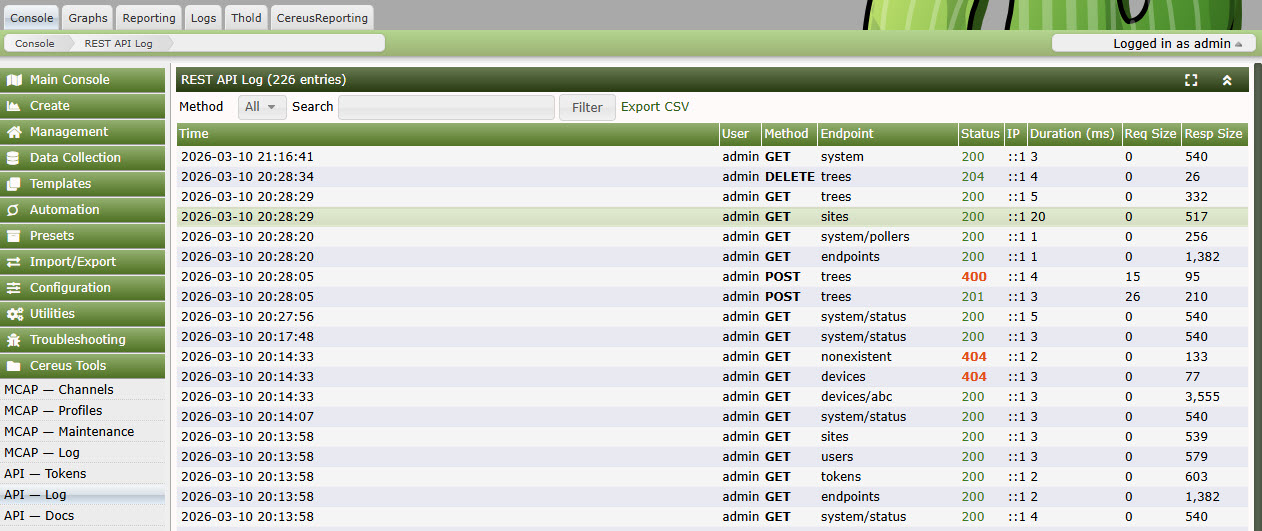
The audit log captures every API call made to your Cacti instance:
- Token identity and associated Cacti username
- Source IP address and response HTTP status code
- Endpoint path, HTTP method and response latency
- Timestamp with millisecond precision
Filter by date range, token, endpoint or status code. Export the filtered result to CSV for security audits, compliance reporting, or incident investigation.
API Audit Log
Technical Requirements
- Cacti: 1.2.17 or newer
- PHP: 7.4 or newer (8.x recommended)
- Cereus License Manager: Required for Professional and Enterprise editions
- Database: MySQL 5.7+ / MariaDB 10.3+
- Web Server: Apache or nginx with mod_rewrite / try_files support
Frequently Asked Questions
Does the API respect Cacti's device-level permissions?
Yes. Every API call is resolved against the Cacti user account linked to the token. If that user cannot see a device in the Cacti UI, the device will not appear in the API response either.
Can I create tokens for service accounts?
Yes. Create a dedicated Cacti user with the minimum permissions required, then create an API token for that user. The token inherits exactly those permissions — nothing more.
How are tokens stored?
Token values are hashed with SHA-256 before being written to the database. The plain-text token is only shown once at creation time. Even with direct database access an attacker cannot recover a valid token.
Can external tools call the API from scripts or CI/CD pipelines?
Yes. The API uses standard Bearer token authentication compatible with curl, Python requests, Ansible URI module, and any other HTTP client. Combine with IP restrictions to lock tokens to specific infrastructure.
Can I add my own endpoints from another plugin?
Yes. Cereus REST API fires a Cacti hook that third-party plugins can use to register additional route handlers. Your endpoint automatically inherits authentication and audit logging.
Give Cacti the API It Deserves
Free read-only access today. Upgrade to full CRUD when you need it.