
Cereus Data Export – Scheduled Data Export Plugin for Cacti
Cereus Data Export – Get Your Cacti Data Out
Schedule automated exports of Cacti RRD graph data to CSV, JSON and XML. Deliver to a local directory, send by email, or transfer via SFTP — on any schedule from every poller cycle to monthly.
Feed Cacti Data Into Any System
Cacti stores all historical metric data in RRD files — a compact but proprietary format. Cereus Data Export reads those files using rrdtool xport and writes the time-series values to standard formats that any BI tool, spreadsheet, database or data pipeline can consume.
Define an export once: choose which graphs to include, set a schedule, choose a format and a delivery method. After that, the poller handles everything automatically.
The Community edition is free and supports CSV exports to a local directory. Upgrade to Professional for JSON/XML, email delivery, hourly-to-monthly scheduling and column filtering. Enterprise adds SFTP delivery and unlimited export definitions.
Export Definition Management
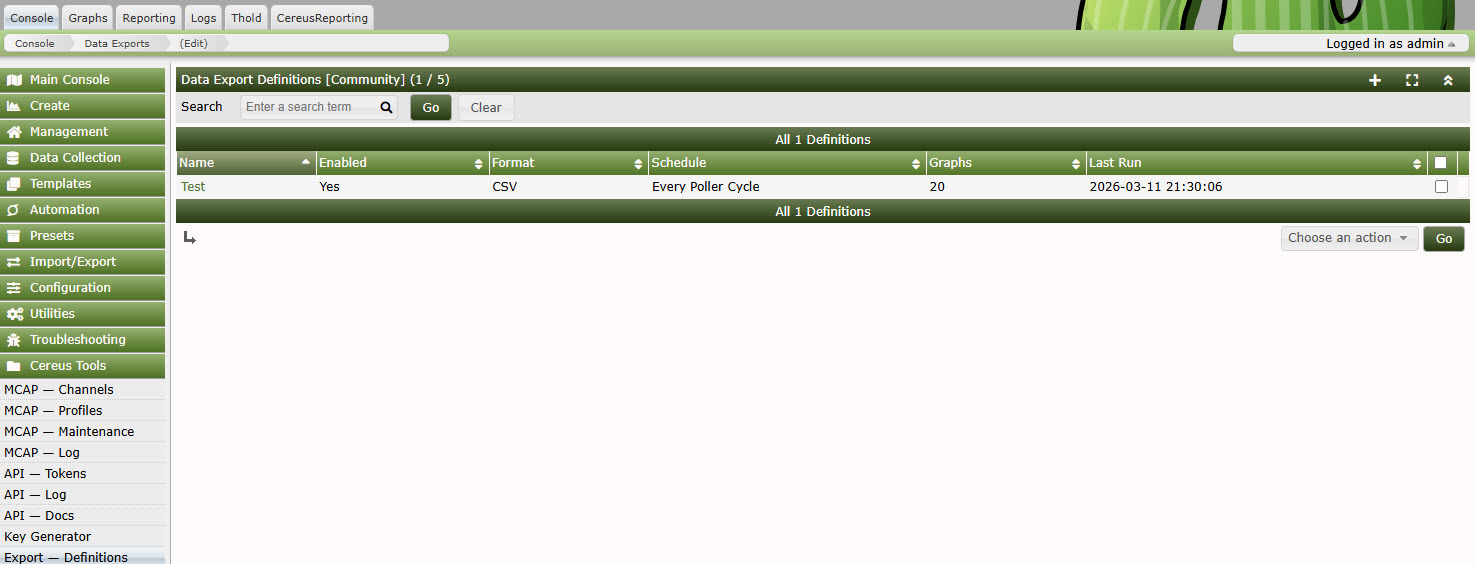
Flexible, Reliable, Fully Automated
Three Export Formats
CSV for spreadsheets and databases. JSON for APIs and modern data pipelines. XML for legacy systems and enterprise middleware. All formats include timestamps, data source names, and graph metadata.
Flexible Scheduling
Run every poller cycle (default 5 minutes), hourly, daily, weekly, or monthly. Each export definition has its own independent schedule so high-frequency metrics and monthly summaries can coexist.
Multiple Delivery Methods
Write to a local directory for on-server processing. Send as an email attachment via the Cacti mailer. Transfer to a remote server over SFTP for archiving or downstream processing.
Graph Bulk Actions
Add or remove multiple graphs from an export definition in one action using Cacti’s standard bulk-selection interface. Manage large export sets in seconds rather than minutes.
Column Filtering
Choose exactly which data sources to include per export definition. Exclude internal consolidation columns. Keep export file sizes small and downstream schemas clean.
Export Log
Every export run is logged with status, runtime, row count, and any errors. View the log from the Cacti UI, filter by definition or date, and export the log itself to CSV for operations reporting.
Export Definition Editor
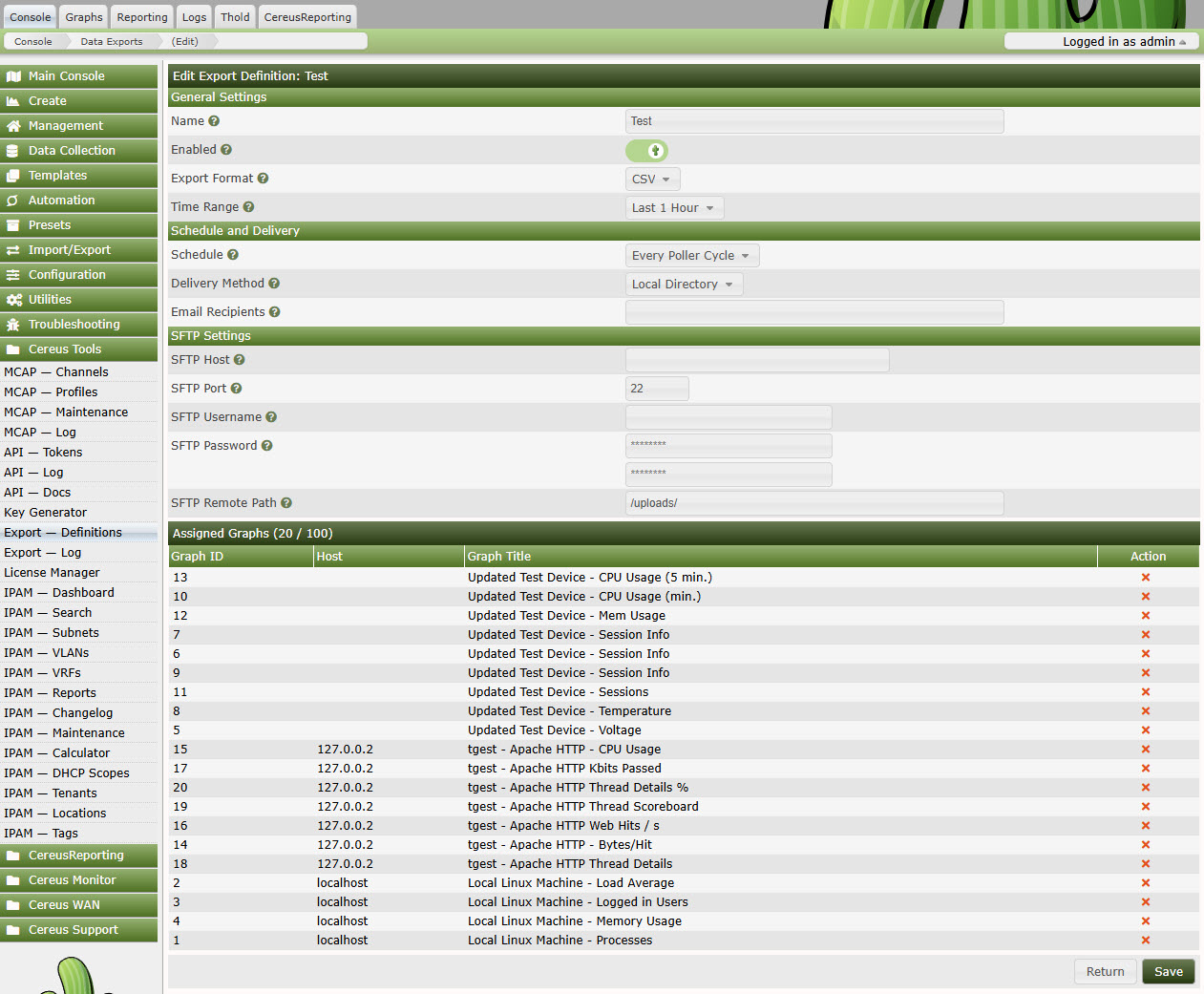
Configure format, schedule, delivery method and graph selection in a single screen. Bulk-add graphs from the Cacti graph list.
Pricing
| Feature | Community Free | Professional Contact for pricing | Enterprise Contact for pricing |
|---|---|---|---|
| Export Formats | CSV | CSV, JSON, XML | CSV, JSON, XML |
| Export Definitions | 5 | 50 | Unlimited |
| Schedule Options | Every poller cycle | Hourly / Daily / Weekly / Monthly | Hourly / Daily / Weekly / Monthly |
| Local Directory Delivery | ✓ | ✓ | ✓ |
| Email Delivery | — | ✓ | ✓ |
| Column Filtering | — | ✓ | ✓ |
| SFTP Delivery | — | — | ✓ |
Export Run Log
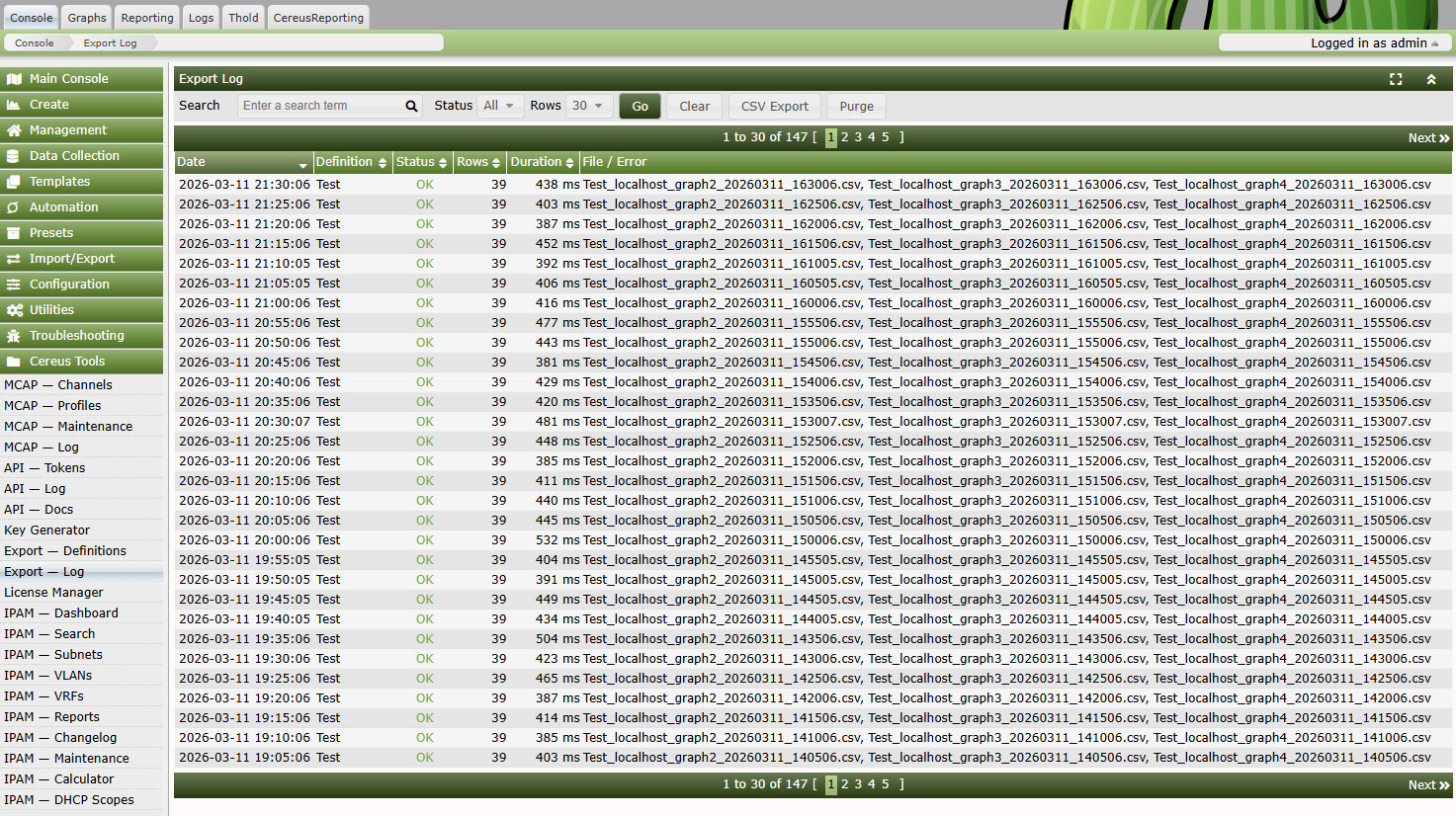
Know What Ran and When
The export log gives you full visibility into every scheduled run:
- Definition name, format and delivery method
- Run timestamp and duration
- Number of rows and graphs exported
- Delivery status (written / emailed / transferred)
- Error detail for any failed run
Purge old log entries automatically or on-demand. Export the log to CSV for operational reporting or SLA evidence.
Technical Requirements
- Cacti: 1.2.17 or newer
- PHP: 7.4 or newer (8.x recommended)
- RRDtool: 1.4 or newer (1.5+ recommended for full timestamp support)
- Cereus License Manager: Required for Professional and Enterprise editions
- SFTP Delivery: Requires PHP ssh2 extension (Enterprise only)
- Database: MySQL 5.7+ / MariaDB 10.3+
Frequently Asked Questions
What time range does each export cover?
Each export definition lets you configure the time range: last hour, last day, last week, last month, or a rolling window. The plugin uses rrdtool xport to read the exact same data that Cacti uses to draw graphs.
Does this replace the old nmidDataExport plugin?
Yes. Cereus Data Export was designed as a modern replacement for nmidDataExport, which breaks on Cacti 1.2.x. The new plugin uses correct rrdtool xport calls, prepared statements, and supports RRDtool 1.5+ timestamp offsets.
Can I export data from multiple graphs in one file?
Yes. A single export definition can include as many graphs as you like. The output file contains one row per time step with columns for each data source across all selected graphs.
What happens if rrdtool fails for one graph in a batch?
Failed graphs are logged individually. The export continues with the remaining graphs and the log entry records which graphs produced errors, so you can diagnose without losing the rest of the batch.
Is the Community edition open source?
Yes. The Community edition is open source and freely available on GitHub. Professional and Enterprise features are gated by the Cereus License Manager plugin and require a paid license.
Start Exporting Your Cacti Data Today
Free CSV exports with no limits on graphs. Upgrade for JSON, XML, email delivery and more.